Showing posts with label software quality. Show all posts

Monday, July 9, 2012

Develop with Attention to Details

As a software developer or a tester a critical asset is the ability to pay attention to small details. Regardless of what kind of project you're doing everything boils down to a collection of details that form your product. Most people love to brag about these details when showing off their work. Details like how their game can render the most realistic bloom effects of any game with no impact on framerate. But individual details aren't the whole story.

Attention to detail doesn't just mean being aware of every little nit-picky speck of your brilliant piece of artistry. Attention to detail means understanding how each detail relates to each other detail. Your program isn't a list of discrete bullet points. Your program is all of the interactions that the entire set of points taken as a whole.

You may remember me criticizing the design of testlink's XML RPC API a few blogs ago. For this example I'm going to use testlink again. This time I'm going after the user experience of creating a test plan.

The process of creating a test plan within testlink is meant to be made up of a specific sequence of steps:

  • Create any new test cases that are needed
  • Create the platforms the tests are to run on
  • Create the test plan
  • Assign the platforms to be tested to the test plan
  • Assign the test cases to be run to the test plan
  • You're done!

So, pretty straightforward. Here's what happens behind the curtains (minus a lot of irrelevant details, mainly a ton of housekeeping work with the table nodes_hierarchy):

  • Fill the database tables testcases, testsuites to create tree of test suites and cases
  • Fill the database table platforms
  • Fill the database table testplans
  • Fill a join table associating platforms with testplans
  • Fill a join table associating pairs of platforms and testcases with testplans

Still straightforward right? Except the UI of testlink doesn't require users to associate any platforms with a test plan before assigning test cases. This is reasonable since a lot of projects aren't multiplatform. Even if a project is multiplatform there's no obvious reason creating test cases first can't be done if mostly the same tests will run regardless of platform. Or at least based on the information presented by the UI.

This is what happens if test cases are associated first:

  • Fill the database tables testcases and testsuites
  • Fill the database table platforms
  • Fill the database table testplans
  • Fill a join table associating testcases with testplans
  • Fill a join table associating platforms with testplans

The problem here lies in the fact that the 2nd to last step does not associate test cases in the test plan with platforms since that information isn't available. In most cases the final step doesn't correct the error causing testlink to enter a messed up state that a regular user can't easily correct.

Now, in testlink's defence, there is an attempt to detect the problem condition but it requires the user to notice an easily ignored "critic" message and follow instructions provided on it. The user has to first add a single platform to the test plan, save, then add the others. Assuming the user follows the instructions they'll have their existing test cases paired up with one platform. All of the other platforms added to the test plan need to have their test cases flagged manually. For most real-world applications this is highly tedious.

My first change is to automatically associate test cases with any platforms added to the test plan. My assumption is that if you're targeting multiple platforms you want the majority of your features to work the same on most platforms with a few exceptions. Adding those exceptions would be a lot less tedious than adding everything.

Now there's a problem with my approach which isn't a problem in the original. What happens if someone makes a test plan with no platforms, runs it, then decides to port their software to multiple platforms, showing this by adding all the supported platforms to their test plan in one go?

Feel free to comment with what you think the logic error in my fix (there is one) is. Hint: the instructions provided when testlink detects the problem (add one platform which associates with existing test cases, then all others) won't run into the logic error in my approach.

Monday, June 11, 2012

Comments on Test Driven Development

It's always nice to spend a bit of time on nerd rage. I was considering a follow up to my meta-rant instead of this but I'll refrain from doing so. If anyone wishes to have a follow up on something specific feel free to leave a comment. But before doing so, yes I'm aware of the author's weak follow up article. Stating (paraphrasing) "the article was a joke, rebutting it shows you have no humor" is, in my opinion, a cop out. Either back up your statements or admit you made mistakes. On to the actual blog.

Test Driven Development is Cool

For those who are unaware test driven development (TDD for short) is a method for making software where you start by developing automated tests for your program then write your program to pass those tests. It's a process which I'm a big fan of. Since I've been using TDD for a while now I figured I could share a few comments from my experiences using TDD.

Test Driven Development Makes you Think

More specifically, TDD forces you to think about how the code you're writing will be used. This is especially useful when designing an API. A typical process begins with you designing an interface for whatever you're doing, then writing tests that use that interface. Remember my earlier article on web services? For a short summary; I discussed how you should try automate common work within an API to minimize the code required to do useful stuff with it. I used Testlink's XML RPC API as an example of a suboptimal API. It's not awful but using it results in a lot of code bloat and, as a result, poor performance.

In order to develop a good unit test you need to first think of how your API is going to be used. Each potential use for your API becomes a single test. It's very easy to come up with a few dozen tests for a relatively simple API. Doing this you'll see what parts of the API get re-used very quickly, i.e. boilerplate. And if you're developing a lot of tests I think you'll begin to see why I refer to such code as menial bullshit. And when your API makes you angry you'll begin to think of ways of making it easier to use.

Testing is Faster with TDD

Let's imagine you're making a game. Games have a huge variety of data that needs to be stored. Sure, the absolute quantity of data isn't all that big (relatively speaking, financial and analytics software have games beat by lightyears) but there is a lot of very different data. Some things such as sound samples, music, 3D models, 2D images and such have established formats others such as game levels, entities, AI code, saved games, recorded gameplay footage (for games that still do that, I miss old FPS games...) tend to vary from game to game. And all of that data needs code to handle loading it into the game and saving it from creation tools.

Using a conventional dev/test cycle would mean creating the code, integrating it into the game and tools and finally creating content using the tools before being able to do any effective testing of the code. And testing the resulting data means opening up the game and tools and manually using them to see that the data is correct. In-game testing in particular tends to require going through a lot of extra effort (i.e. starting the game, getting to a testing level, and setting up your test.) That's slow.

Using Test Driven methods means deciding what sort of data your file format will initially contain producing some mock sample then writing unit tests that use your game's file loader to load the file then verify the data they produce matches with what you expect. Each unit test works with a small amount of data to verify a specific part of your file loader works correctly. You can also easily create additional tests to check that different combinations of features in your file loader work correctly. Obviously there's the risk of combinatorial explosion but that's easy enough to avoid by limiting unit tests to covering features in isolation and obvious feature combinations. This will give you the most bang for your buck. Other tests can be added if bugs are discovered.

The speed advantage comes from eliminated testing overhead. When you need to test your code you simply run your unit tests. No need to run your asset creation tools, or the game or anything else. The only limit to the speed of your testing is the speed of your code. The best part, if you're skeptical about TDD, is you don't need to fully buy into TDD to do this. Just supplement your manual testing effort with unit tests. Even better, if you automate your product's build process then you can have your tests run automatically too by making your build tool run the tests right after a successful build finishes. Your entire dev team can then be notified about failing tests just like they would be for build breaks.

Test Driven Development has Problems

So far I've painted an extremely rosy picture of TDD. However, like all processes, it's not perfect. Far from it in fact. There are a good number of caveats about using TDD.

You Must Make Testable Code

Remember my comment on testing being made faster by TDD? This is only true if your code can easily be unit tested.

This is both good and bad. On one hand testable code tends to be very easy to work with since it doesn't have a lot of baggage that prevents it from being picked up and used. On the other hand, that baggage may be necessary for your code to perform optimally. Nine times out of ten however you're best off developing testable code. And if you think you think your case might just be that one you're probably wrong. Check first. This applies to all code regardless of whether you're making web applications or embedded software on a high performance real time OS

One tip: modularize. This means not only conventional modularization by keeping objects and procedures from being overly inter-dependent, but also moving parts of your project into libraries to make it easier to build tests without pulling in huge quantities of code. This pushes compile times downward for when you're testing and allows faster testing.

You Still need Conventional Manual Tests

Unit tests and other automated tests that are commonly produced by test driven development are great for verifying software interfaces and behavior. However, unless you're producing automation tools, you're not going to find anywhere near the full set of issues.

For example, you can't test that your software's workflow fits your users' expectations. Automated tests can't verify that a game is fun. Artistic merit is impossible to judge with software alone. The most bizarre interoperability issues typically only crop up during general use of your software and require manual testing. For a completely contrived example on a smartphone, when playing music on a media player, visiting a flash site on one browser tab and visiting an HTML5 site on another and using the GPS causes the phone to crash at random. But only for certain commuters in the big city during rush hour.

Unless your test developers are completely evil and have a lot of time and money you're not going to get these kinds of things happening in your automated test. Particularly if you follow conventional best practices for unit tests which tests stuff in isolation. The only way you're going to find these issues is if you have manual testing reflective of how your real users would use your product.

Test driven development works as an excellent complement to ad hoc manual testing. Without TDD you're unlikely to have the tester time available to do the kinds of heavy exploratory testing that would find issues like our phone crash during a morning commute and without skilled testers doing that sort of testing you're unlikely to get the critical information need to fix the issue.

Tuesday, May 15, 2012

A Mini-rant on Documentation

If you're releasing a non-trivial API... for example a YAML parser for .NET. Please remember to document the most commonly used functions so it's easy to understand how they relate. Whatever you do, don't write undocumentation.

What is undocumentation? Well, if you didn't follow the link, it's something that looks like documentation but is devoid of anything that makes it useful documentation. Like this:

// Default constructor for the Node object
Node::Node()
{
   // do stuff
}

This documentation says nothing that the code doesn't already say. Writing documentation sucks. I know. But in this case not writing documentation is an equally meaningful alternative. And it saves everyone time. Particularly me since I now know I have to search for code samples or troll message boards and Stack Overflow to get the information I want.

Rant over.

If you insist on taking the time writing documentation make sure whatever you write isn't stuff made obvious in your method signatures. To mangle DC Comics for a second; a constructor is. You don't need to tell me it's a constructor. Tell me what isn't shown in the code. Tell me when I might use it. Tell me how I can cause it to fail. Tell me why I'd need it in the first place. Every piece of your documentation should provide a hint about how you intend your functions to work together. Preferably, these hints should be about as subtle as a pile driver.

Ruby on Rails and the Standard Python Library are both generally good examples of documentation. The parts of Ruby itself that I have used were also generally well documented. For all its faults the parts of the Java library I have used were well documented. The issue there was more the godawful design of what I had to work with.

Programmers are lazy and have a low tolerance for unnecessary work. You know best how your API should be used. You should let your users know what you know. A nice side-effect is, usually, more, and happier, users.

As an aside. The YAML parser I mentioned above otherwise looks good. I might make another, less harsh, post about it earlier. I want to use it. But it's taking longer to grok than I'd like. The result was this rant.

Friday, March 23, 2012

A Look at Web Service API Design

Lately I've been spending some time working with the open source test tracking tool testlink For tracking manual testing efforts and linking tests to software requirements and other SDLC essentials it is a very nice tool. However its API leaves something to be desired. So today's topic is designing a usable API.

The purpose of the API is to allow automated testing to be tracked and reported in testlink much like manual tests are. In addition it could be used to provide a hook into an automated build system so testers are aware of new work asap. Testlink tracks test sets in two ways. First is test suites. These represent your entire pool of available tests. Second is test plans. Test plans represent some set of tests you need executed by your testers or your automation system and are taken from the test suites. Test plans are executed against builds of your software on one or more platforms (eg windows and Mac)

So with that background we can come up with some ideas for what we need in an API and compare with what testlink actually provides. Let's assume that you already have a working automated build and test system but need better reporting because there is too much data to work with without a tool to help. Since this system is already running and more or less fully automated it's pretty unlikely that anyone would be willing to manually add anything major to the database such as test case information and such.

Given that... Here's what I would expect a reasonable API to provide.
  • Create a test case within a suite which may be part of another suite. Also create the suites if they don't exist.
  • Create a test plan containing a list of pre-created test cases. Update as appropriate.
  • Assign results to tests in a test plan run against a build for a platform.
  • Create a build and associate it with a test plan (or several)

Not too much eh? The nice thing is that this hides a great deal of complexity which is handled manually in normal testing. Hiding complexity is always a major goal for a good API. Another advantage is that this concept keeps requests larger and less frequent. When dealing with distributed systems you pay a fixed time cost for every request made. That cost goes into negotiating connections, security, protocol headers and so on. So, fewer requests to a web API is usually faster.

Sadly testlink makes a very easy mistake in its API design. The developer chose to expose every simple step used in creating test plans and recording results except for a few cases where the API is more difficult to use than necessary. The list of actions look something like this

  • Create a single test suite optionally belonging to another (bad stuff happens if the suite already exists)
  • Create a test case belonging to a previously created test suite (ditto)
  • Create a test plan
  • Create a build
  • Create a platform
  • Assign a platform to a test plan
  • Assign a test case to a test plan
  • Record a result for a test case in a test plan run against a build for a platform
  • Yadda Yadda blah blah.

So. A user of this API needs to jump through the same hoops as they would when doing things manually. While this saves mental effort in designing the API you end up paying for it every time you have to write code to check that a suite (and the suites it's contained in) exists and create everything that's missing via a dozen or so function calls. Not fun.

Think of an API as a time investment. The more menial bullshit your API does for you the less you have to do when using it.

One last example. A test case in testlink has a number of properties such as its author, a description and the steps that are taken to carry out the test. When you use the testlink API you provide a key (a bunch of gibbrish) to get access. The key is unique to you. Now when calling an API to create a test case using your key the API ought to be smart enough to assume you are the author unless told otherwise. The version of testlink I'm using fails to make this leap. This means you need to modify the API (I did this, small win for Open Source) or have both a user name and their key to use the API for just this one function. Again if an API can reasonably do something for a user it should.

Tuesday, February 21, 2012

Making of an Arcade Frontend - Part 3

Last part of this series I talked about how I started coding up the arcade frontend based on translating the features I wanted into tasks the program has to do. One thing I want to do when starting any project is work on tasks that provide the most benefit for the least effort. The strategy I used in the previous part was to pick a task that was needed for a lot of features to work (finding information on games to launch.) The final result is a nice skeleton which I can build the launcher around.

Today I'm going to talk about a second method of getting a lot of visible bang for your programming buck. That is by finishing tasks for the most visible features in the program. In short, make the user interface before other stuff. The first method (finding common tasks and doing them first) is roughly the same as bottom up development for those into jargon. This method of building programs is normally known as top-down development.

If you don't get the names try to imagine a program being like a cake. Top-down means starting with the icing and decorations while bottom-up means starting with... well... with the bottom. Both methods have their gotchas. building from the bottom up tends to mean you have something unappetizing until you're all done your work. But, building from the top down means you have a hollow shell made of icing and fondant. It looks complete and appetizing but its missing everything that makes it a cake.

With that in mind I prefer to do both at once. This way of doing things doesn't translate very well into my cake analogy. The closest idea is to build a cake one slice at a time. What you get is kinda tasty, but obviously incomplete. You end up with something that can be released very quickly that gradually improves until you're done.

Anyway; enough about cake. Let's talk about the arcade frontend... I'm going to create a graphical menu to pick out a game to start. I drew inspiration mainly from the rotating song menu in Dance Dance Revolution. Playable games will show in a semicircle with the selected game in the middle at a larger size than the others. selecting a new game rotates the menu and you can rotate forever in either direction.


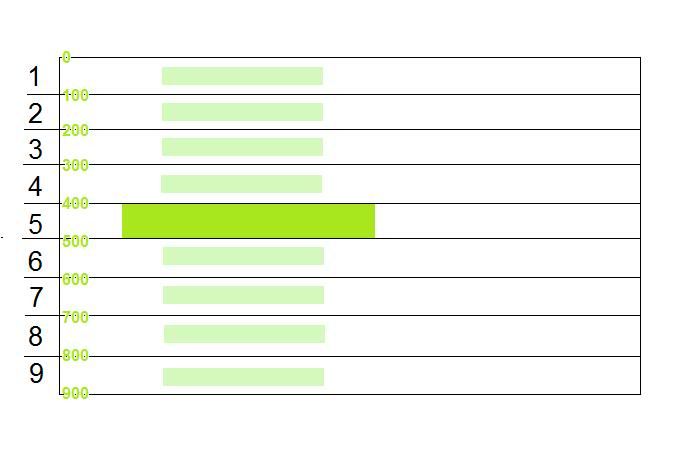
To get the right look requires a bit of math. placing the titles vertically is simple... sort of. Dividing the screen's height by the number of visible items will give you the amount of space each item can take. If you take that number and halve it you get the distance to the center of each space that can be used.

Now, I'm guessing a few people are asking why I need the center of the space where each item goes at all since PyGame draws images positioned at their top left. The reason is that the center of each item will stay the same no matter how large or small the item gets. It's very easy to calculate the top left of the image by subtracting half of the image's size from its center. It's not so easy to calculate the top left of the image relative to the top left of the  The image below shows this better than words can.
Another thing to note is that I'm using an odd number of games in the visible part of the menu. This way there's one "middle" game which is the selected game and an even number of other games around it. Having an even number of games would result in the selected game being off center which looks ugly.

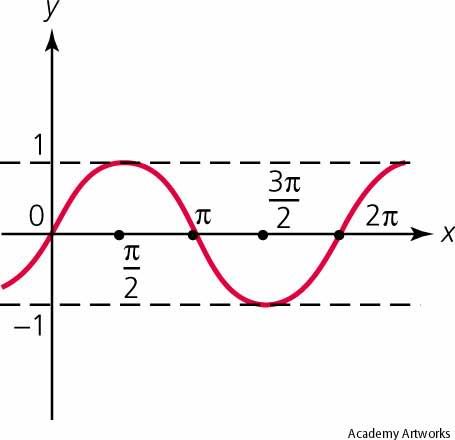
Placing the titles horizontally requires a bit more math knowhow but not much. If you remember your trig class you might recall that the sine function looks like a smooth set of waves like this.


Source: http://images.yourdictionary.com/sine-curve

In programming the sine function usually uses a unit called radians. Radians are how mathheads measure angles. You can do some cool tricks with them once you get it. The important part is that half a circle (180 degrees) is equal to Pi (3.14159...) radians. The cool part is that sine between 0 and Pi radians looks exactly like half a circle. In fact the value of sine at any angle matches how far you are from the center of a circle vertically at that angle.

With that all that needs to be done is to multiply the item number by Pi then divide it by the number of items that are to be visible plus two, put that number into a sine function, then multiply the result by the radius of the circle. Why plus two? In order to support spinning between games an extra game is to appear offscreen and slide onto the screen when changing selection. If we don't take these two items into account games coming onscreen from the top or bottom will wobble to the left or right.

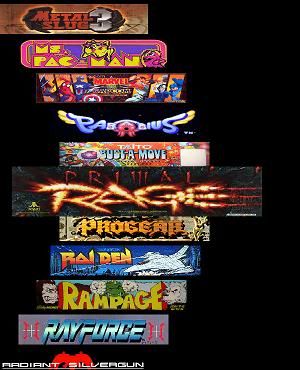
Here's the result of all that math

Not too bad eh?

Next entry I'll be showing some code and talking about how to handle transitions between titles. I'll also show you the code that this entry produced as well.

Tuesday, January 10, 2012

Making of an Arcade Frontend - Part 2

If you haven't read them yet check out the prolog and Part 1

I think it's been a sufficient ahem an excessive time since I've posted last...

During my Christmas vacation I managed to bash out the majority of the features I've wanted to support in my arcade frontend. I had a couple false starts before then. Frustrated, I went with the tried and true "just make the damn thing work" development methodology (aka hacking.)

Well, I didn't build it quite as haphazardly as that. The idea is to translate the project requirements into some minimal functionality that must be created for the project to be considered "working." For a small project like this it only takes about 10-30 minutes of effort. For larger projects it takes longer. Most of the time you'll find some features that are independent of each-other. To get the most bang for your buck your best bet is to start working on some feature that a lot of requirements depend on.

Huh? What?

I'll give an example. This is taken from the requirements list in Part 1 under each requirement is a number of functions that need to be implemented
  • Hide the regular Windows front-end.
    • Using pygame run in full screen mode
    • Leave full screen mode before starting a game, re-enter once the game exits
  • Allow the user to shut down the computer without exiting to Windows
    • Method for responding to user input
    • Method for confirming user action
    • Method for invoking windows shutdown
  • Allow an administrator to exit to windows
    • Method for responding to user input (key-mapped arcade controls)
    • Clean program shutdown
  • Allow rapid selection and launching of games using arcade controls (not keyboard and mouse)
    • Method for responding to user input (key-mapped arcade controls)
  • Support launching any game/program, not just MAME
    • Scan (something) to create a list of programs that are launchable
    • When prompted launch a program using information from the list
  • Display a preview of the selected game
    • Scan (something) to create a list of images associated with games
    • Method to load images as needed 
  • Display a list of games that can be played
    • Scan (something) to create the list of playable games
    • Method for distinguishing selected game from others
    • Method for displaying available games 
  • Display a marquee for the game... somewhere near the screenshot
    • Scan (something) to create a list of images associated with games
    • Method to load images as needed
  • Everything must have an animation
    • This means needing an endless update/draw loop for objects
    • Need a state machine to indicate whether some transition is occurring and what kind
  • Alter control-key mappings to support games without configurable controls 
    • Method to invoke IPAC-2 programmer with some known configuration
    • Scan (something) to create a list of control configs associated with games  
There are a couple things that pop out:
  • Method to load images as needed
  • Scan (something) to create a list of games and things associated with them
Of those scanning comes up the most and, more importantly, relates most directly to the purpose of the program which is starting games.

For my first crack at this I've decided that (something) will be a directory tree containing files called (game)-launcher.cfg which describe playable games. For the sake of organization, since there will likely be well over 100 files, the config files can be in any directory in the tree.

What do I want to put in the file:
  • The program to start
  • Extra information to pass to the program
  • Controller settings for the game
  • Where to find game's marquee, screenshot and other image files
Now, how do I format the file? I don't want to spend an undue amount of time writing a parser so I could use one of Python's built in parsers. But that still means I need code to convert that to an easily usable datastructure (let's just ignore JSON for now since it slipped my mind at the time) So... how about just making it a Python module. That reduces parsing to one line of code. The file itself simply contains a Python dict with a standardized name and standardized keys.

First the code to scan for config files:
def FindAllLaunchables( startDir ):
    outList = []
    dirList = os.listdir( startDir )
    for dir in dirList:
        checkDir = os.path.join( startDir, dir )
        try:
            if os.path.isdir( checkDir ):
                outList.extend( FindAllLaunchables( checkDir ) )
            elif os.path.isfile( checkDir ) and dir.lower().endswith("-launcher.cfg"):
                outList.append( checkDir )
        except WindowsError:
            pass
    
    return outList

That's it. The function recursively scans all directories under startDir and, if it finds a configuration file adds its location to an output list which the function returns.

This bit of code handles reading the configuration file.

def CreateLaunchers( configFiles ):
    launchers = []
    for launcherConfig in configFiles:
        moduleName = os.path.splitext( launcherConfig )[0].replace( os.path.sep, "_" ).replace( ".", "" ).replace( " ", "_" )
        
        moduleFile = open( launcherConfig )
        try:
            modulePath = os.path.split( launcherConfig )
            module = imp.load_module( moduleName, moduleFile, launcherConfig, ["cfg","rt",imp.PY_SOURCE] )
            launchers.append( config.Launcher( module.LauncherConfig ) )
        finally:
            moduleFile.close()
            del moduleFile
    return launchers

The meat here is the call to imp.load_module. The imp module exposes some of the guts of Python's import statement and is useful for importing arbitrary files as modules. Notice the config.Launcher object instantiation. The Launcher class will be used to carry out the work of starting up a game based on its configuration along with some other stuff.

And that's everything! To finish this initial step I stubbed in some code to start up fullscreen mode and to pick up keyboard input. That code is below and makes up the skeleton which the rest of the program will be built around.

pygame.init()

# load configuration
configFiles = FindAllLaunchables( search, skip )
launchers = CreateLaunchers( configFiles )

# startup sequence
screen = SetScreenMode()
pygame.key.set_repeat( 1000, 200 )
pygame.mixer.init()
things = []

# the main loop!
frameStart = time.clock()
time.sleep( 0.01 ) # XXX: don't want a frame time of 0 when starting
while True:
    frameTime = time.clock() - frameStart
    frameStart = time.clock()
        
    for event in pygame.event.get():
        if event.type == pygame.QUIT or (event.type == KEYDOWN and event.key == pygame.K_F12):
            sys.exit()
        
    for thing in things:
        thing.Update( frameTime )
        thing.Draw( screen )
    pygame.display.flip()
    screen.fill( (0,0,0) )

Whelp, that's all for part 2. I'll have more for you next time! (and since the project is working, next time should be sooner, not later) SetScreenMode isn't all that exciting so I've spared you its details. Notice that with this code we now have the following done.
  • Using pygame run in full screen mode
  • An endless loop to update/draw objects
  • Method for responding to user input (stub)
  • Scan (something) to create a list of games and things associated with them
Not bad for one blog-entry worth of work eh?

Tuesday, August 16, 2011

Do not use Java. Ever.

While browsing The Daily WTF I was led to this gem of a bug in Java. As if being bought out by Oracle wasn't enough.

I doubt the issue will ever be fixed since nobody in the OSS community seems to bother reading documentation for any APIs regardless of who produced them (based on rants from Linus and the above bug). Perhaps if they gave a shit about reading docs they'd give a shit about writing docs eh? But I digress...

Strike that... generalizations like that aren't fair since the OSS community is large and subject to Sturgeon's Law like any other. And subject to GIFT like any online community.

JAVA RANT TIME!


My experience with Java as an application development tool has been, frankly, appalling. AWT and Swing, when combined with NetBeans' visual editor tool, are easily the worst APIs I've ever had to work with.

A theme I've seen in my mercifully brief experience with Java is that it arbitrarily chooses to do things differently. Not necessarily because it's less verbose (Java code tends to be anything but verbose) or more flexible (where LISP supposedly cornered the market). Just different... in a manner that's pointless and stupid.

Imagine if you will that you're designing a data type to store dates. Some methods that might spring to mind would be GetDayOfMonth, GetDayOfWeek, GetMonth, GetYear, GetLengthOfMonth and so on. All fit common use cases for the printing of dates in various fashions used by humans. Using the functions wouldn't require consulting any documentation. So what does Java do? Mash all of that into one function! You say that description isn't all that helpful since it doesn't link to relevant information. Fuck you! Find it yourself! (it's here) Oh and let's not call the type for storing dates Date or anything like that. Let's call it GregorianCalendar, so that the most obvious common use cases are buttfucked right away.


Most software engineering programs include at least one course on how to make quality code. The fundamental rules of quality can be summed up as follows.

Make your program's actions and purpose blindingly obvious to the next idiot to see them.

Java's standard library fails even that relatively simple test. Ruby, Python, C#, C, Perl and who knows how many other languages manage to achieve this feat. This is stupid! The only other language which consistently pisses me off like Java is Perl. At least Perl is honest in being a pile of random hacks stacked haphazardly together to scratch some developer itches. Perl is a lazy tool for lazy developers. It fills its niche nicely though arguably Ruby and Python are better languages for the same niche and more besides.  
  

Don't use Java. Ever. If your environment is a JVM then try to use a better language that compiles to bytecode. You can find them, JRuby, Groovy, Jython, etc. If you can't do that then at least avoid using Sun's ass-tastic libraries... if Sun has a good library somewhere feel free to use that but my experience makes me doubt the existence of such a beast.

What's a better language? C#, Python, Ruby, C++ (despite its many flaws), Visual Basic (again despite its many flaws, I think this reflects nicely on how utterly godawful I think Java is) 

Sunday, July 31, 2011

Making of an Arcade Frontend - Part 1

Ah, time to take a break from work and dealing with ASP.NET web applications, continuous integration servers and all that fun (but boring to talk about) crap. Time, for The Making of an Arcade Frontend!

H'okay. So, like any good software project, my arcade frontend needs a plan. And any good plan starts with a set of goals. A bunch of things the frontend is required to do. In other words, software requirements. Woo! Exciting! Sounds like something out of a college software quality course eh? Well, at least a good software quality course would discuss requirements. After all, it's hard to tell whether your software is "right" or "good' if you don't even know what right or good are.

There are a few ways of going about making software requirements. You can write up a paragraph of what you want the program to do. Or you could make a checklist of features. Or you could draw a bunch of pictures. Or you could write a formal SRS document. The choice is yours.

I tend to favor brevity when coming up with goals for my software. It reduces the amount of effort I expend on the requirements stage dealing with contradictory requirements and other general issues. It also helps avoid falling into the trap of writing requirements as a set of instructions on how the program will work; instead of what the program needs to accomplish. If you do fall into the trap of writing a how-to for your program you'll regret it when you find that the design won't work with real code. Good requirements say nothing of how they get achieved. For a large project I tend to go with a short paragraph describing each requirement. A couple sentences does the trick quite nicely. Small projects only really need a set of bullet points. There's no hard and fast rules on what is or isn't descriptive enough for a given project. It really depends on the size of the projects and who is working on it. Practice makes perfect.

So, what are the requirements for my arcade frontend? Here they are.
  • Hide the regular Windows front-end. It should appear as soon as the computer becomes usable.
  • Allow the user to shut down the computer without exiting to Windows
  • Allow an administrator to exit to windows (e.g. to install more games)
  • Support launching any game/program, not just MAME
  • Allow rapid selection and launching of games using arcade controls (not keyboard and mouse)
  • Display a preview of the selected game
  • Display a list of games that can be played. Preferably in a manner that looks pretty (e.g. like how DDR displays its song list)
  • Display a marquee for the game... somewhere near the screenshot
  • Absolutely no hard transitions. Everything must have an animation to go with it
  • Alter control-key mappings to support games without configurable controls 
See, nothing all that complicated at all. So, now that I know what I want to do, I need to decide how to do it. That's for another article.